
Kubernetes for ML, Explained the Way I Wish Someone Had Explained It to Me
Bhupin Baral
April 22, 2026
Six resources. One production ML system. No fluff.
The 2 AM page that changed how I think about ML infrastructure
A few years ago I got paged at 2 AM. Our inference API was down.
Not “slow.” Not “degraded.” Down. Every request returning 503s. A customer’s mobile app — a real product, with real users — was showing a blank screen where our model’s output should have been.
I opened my laptop. Checked the logs. The model had OOM’d on a traffic spike. No replicas. No load balancer. No autoscaling. One container, one server, one single point of failure that my team had shipped with the confidence of people who hadn’t yet been paged at 2 AM.
I spent the next three hours stitching together a manual fix. Then I spent the next three months rebuilding the whole thing on Kubernetes.
I’m writing this post for the version of me that didn’t know any better. If you’re a founder, a CTO, or an engineer who’s about to deploy an ML system into production — or who already has and is quietly waiting for it to break — this is the foundation you need.
You don’t need to master Kubernetes. You need to understand six things. Namespaces. ConfigMaps. Secrets. Pods. Deployments. Services. That’s it. That’s the shape of every real-world ML system I’ve deployed in the last four years.
Let’s walk through them in the order they actually matter.
Why Kubernetes at all?
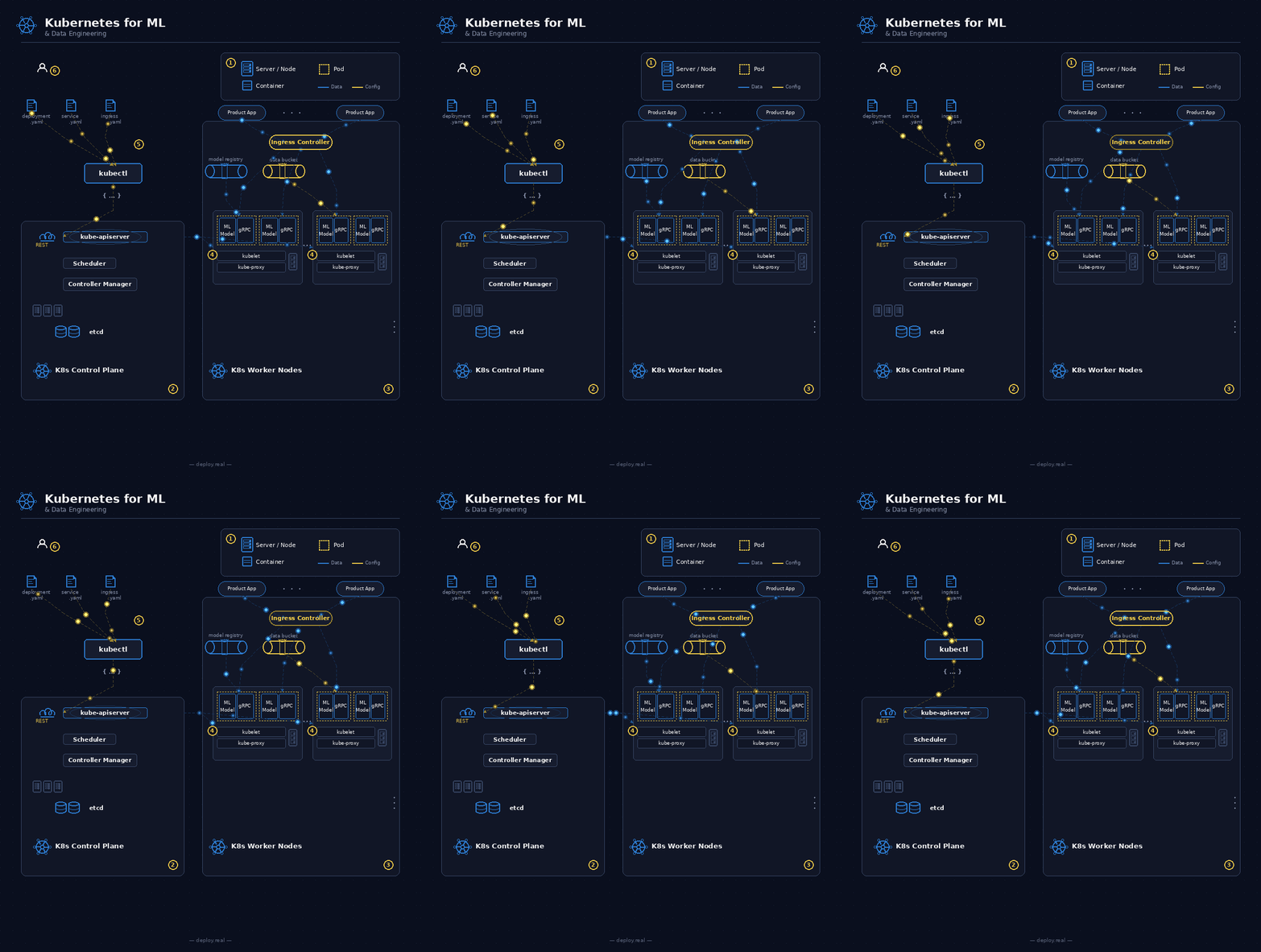
Before we go deeper, one honest answer to the question every founder asks me: do I really need Kubernetes?
If you have one model, running on one server, serving fewer than a thousand requests a day — no. Kubernetes is overkill. Deploy it on a single VM, put Nginx in front of it, and get back to building your product.
But the moment any of these become true, you need it:
- You have more than one model, or you want to deploy multiple versions of the same model side by side
- You need to scale inference based on traffic (not manually, not at 2 AM)
- You handle sensitive data and “it lives in env vars on a VM” isn’t going to survive your next audit
- You’re building on a team larger than two engineers
- You’ve ever said the words “I hope nothing happens this weekend”
Kubernetes solves one core problem: it turns your infrastructure into declarative, self-healing code. You describe what you want. The cluster makes it true. If reality drifts from your description — a pod dies, a node fails, traffic spikes — the cluster corrects itself.
For ML workloads, this matters more than for regular web services, because ML infrastructure is expensive and sensitive. A GPU node costs thousands per month. A leaked API key to your model endpoint can burn through your budget in hours. Downtime on an inference API is downtime on your product.
Kubernetes gives you the primitives to run all of this safely. There are exactly six primitives you need to understand first.
1. Namespaces — Three walled rooms inside one cluster

The first thing I do in any new cluster is create three namespaces: dev, staging, prod.
A namespace is a logical boundary inside a Kubernetes cluster. Think of your cluster as a warehouse and namespaces as separate walled rooms inside it. They share the same underlying hardware, but they’re isolated from each other.
Why this matters for ML:
The ML lifecycle is inherently multi-stage. You train in one environment. You evaluate in another. You serve in a third. If all three live in the same namespace, one engineer running kubectl delete pod --all on the wrong terminal will take down production. I've seen it happen. More than once.
Here’s what my typical setup looks like:
# namespaces.yaml
apiVersion: v1
kind: Namespace
metadata:
  name: dev
---
apiVersion: v1
kind: Namespace
metadata:
  name: staging
---
apiVersion: v1
kind: Namespace
metadata:
  name: prod
Apply it with kubectl apply -f namespaces.yaml and you've got three isolated rooms.
What you put in each:
- dev — Experimental training runs, notebooks, anything an engineer is actively iterating on. Loose access. Anyone on the team can deploy here.
- staging — Model evaluation pipelines, A/B shadow traffic, integration tests. Tighter access. Requires review.
- prod — Live inference APIs, scheduled batch jobs, everything customer-facing. Strict access. Only CI/CD and on-call engineers can touch it.
Each namespace has its own RBAC rules, its own ConfigMaps, its own Secrets. A Secret called openai-api-key in dev is a completely separate object from openai-api-key in prod. An engineer with access to dev cannot read the prod secret. This is the most important property.
The practical rule: never share credentials across namespaces. The dev environment should have its own scoped-down API keys with spend limits. Prod should have the real ones. If someone accidentally commits the dev key, your downside is bounded.
One cluster, three walled rooms. Training mistakes in dev never touch prod traffic.
2. ConfigMaps — Change behavior without rebuilding the image
Here’s a mistake I see every startup make in their first ML deployment: they hardcode their hyperparameters into their container image.
Model name. Temperature. Max tokens. Top-k for retrieval. All baked in. Then when they want to tune something — change the temperature from 0.7 to 0.2, for example — they rebuild the image, push it to a registry, and redeploy. Ten minutes of work for a config change that should take ten seconds.
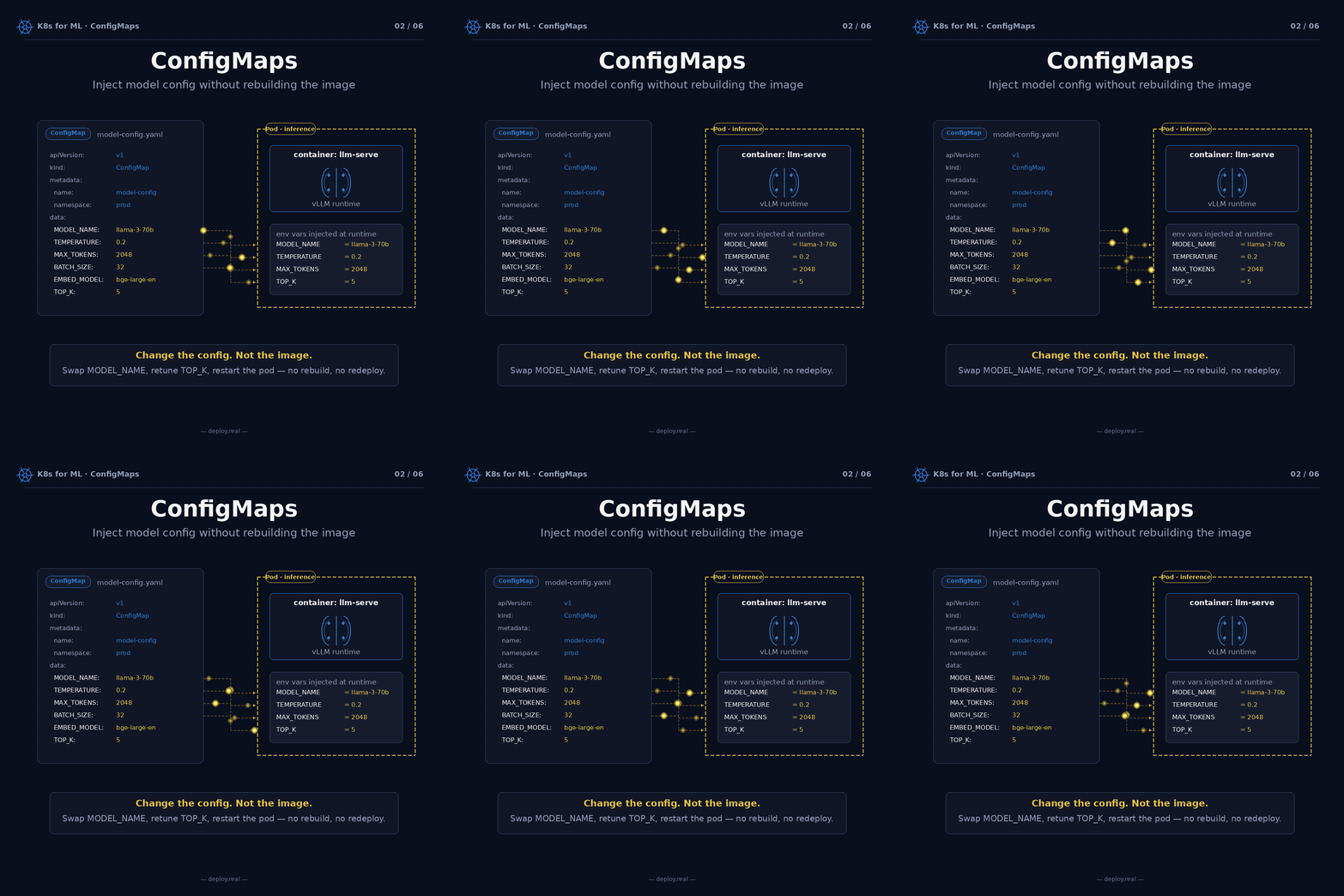
ConfigMaps solve this. A ConfigMap is a plain-text bundle of key-value pairs that Kubernetes injects into your pod at startup. Your application reads them as environment variables (or mounted files). Change the ConfigMap, restart the pod, done.
# model-config.yaml
apiVersion: v1
kind: ConfigMap
metadata:
  name: model-config
  namespace: prod
data:
  MODEL_NAME: "llama-3-70b"
  TEMPERATURE: "0.2"
  MAX_TOKENS: "2048"
  BATCH_SIZE: "32"
  EMBED_MODEL: "bge-large-en"
  TOP_K: "5"
And in your pod spec:
spec:
  containers:
    - name: llm-serve
      image: myorg/llm-serve:v1.3
      envFrom:
        - configMapRef:
            name: model-config
That envFrom line is the whole trick. Every key in the ConfigMap becomes an environment variable inside the container. Your application code reads them with os.environ["TEMPERATURE"] and you're done.
Why this matters for ML specifically:
ML systems have dozens of tunable knobs. Context window. Chunk size. Retrieval strategy. Reranker threshold. Temperature for the generation model, but a different temperature for the classifier fallback. In a real RAG pipeline you can have 30+ such parameters.
You don’t want any of these in your code. You want them in a ConfigMap, visible, version-controlled, changeable without a rebuild.
The payoff becomes obvious the first time you need to A/B test two values. You deploy two copies of your inference service, point them at different ConfigMaps, split traffic between them. No code changes, no rebuilds, just two YAML files.
Change the config. Not the image. That single principle will save you more engineering time than any other on this list.
3. Secrets — Where your API keys actually belong
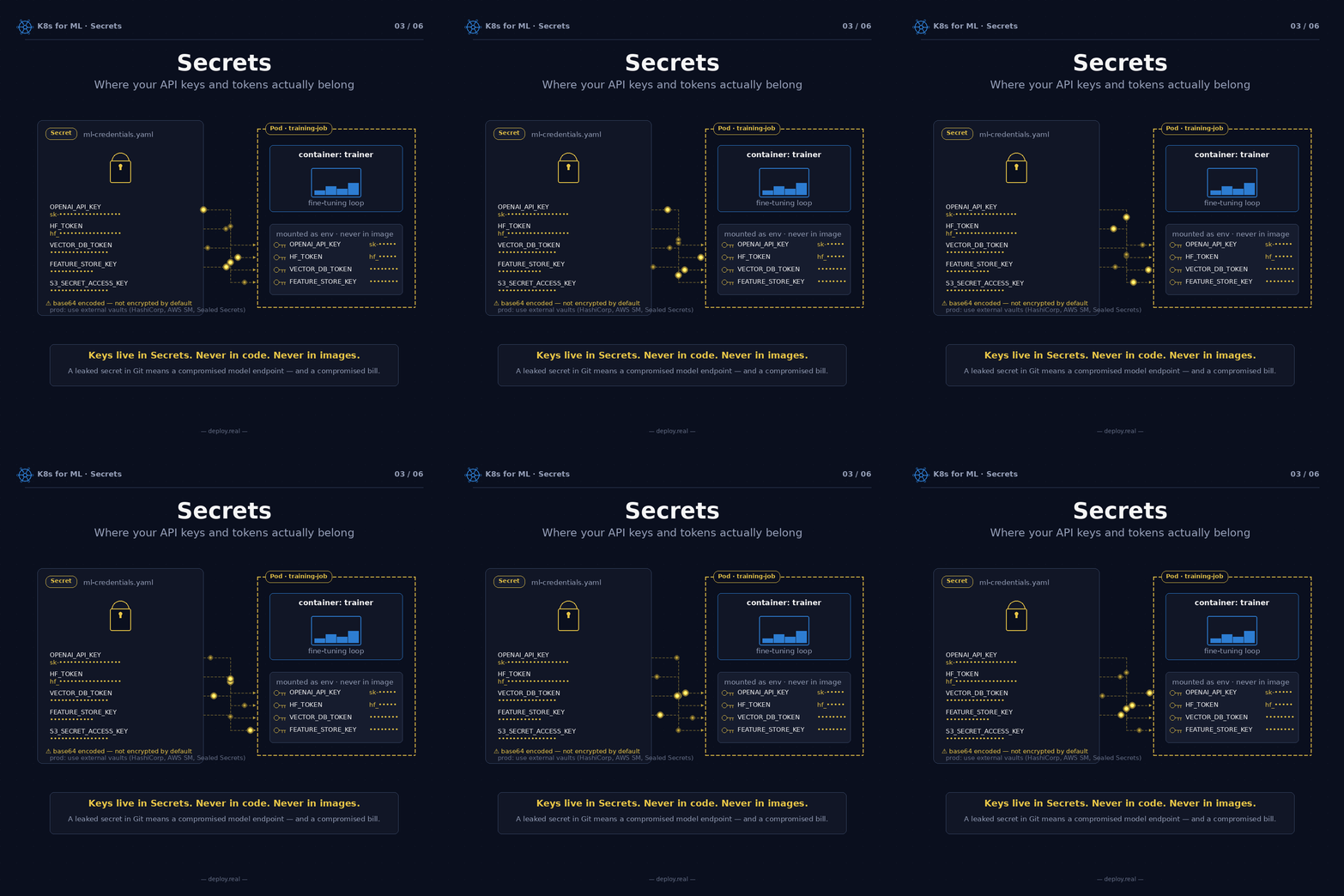
If ConfigMaps are for non-sensitive config, Secrets are for credentials. API keys. Database passwords. OAuth tokens. Anything that would be a disaster if it leaked.
I need to give you the honest truth up front: Kubernetes Secrets are not really secret by default. They’re base64-encoded, which is not encryption. If someone has kubectl access to your cluster, they can decode any Secret in one line of shell.
That sounds bad. It is, kind of. But it’s still dramatically better than the alternatives:
- Secrets are not baked into your container image (so they don’t leak when the image does)
- They’re not committed to Git (assuming you actually use .gitignore correctly)
- They’re scoped to a namespace, so RBAC controls who can read them
- They can be rotated without rebuilding anything
For production ML workloads handling real customer data, you should upgrade from vanilla Secrets to one of:
- HashiCorp Vault with the Kubernetes auth method
- AWS Secrets Manager with the CSI driver
- Sealed Secrets (Bitnami) for encrypted secrets safely committable to Git
- External Secrets Operator to sync from any vault
But to start, vanilla Secrets are fine. Here’s the shape:
# ml-credentials.yaml
apiVersion: v1
kind: Secret
metadata:
  name: ml-credentials
  namespace: prod
type: Opaque
data:
  OPENAI_API_KEY: c2stXFhYWFhY...         # base64 encoded
  HF_TOKEN: aGZfWFhYWFhY...
  VECTOR_DB_TOKEN: WFhYWFhYWFhYWFhY...
  S3_SECRET_ACCESS_KEY: WFhYWFhYWFhYWFhY...
Create the encoded values with echo -n 'sk-real-key-here' | base64.
Inject them into your pod the same way as ConfigMaps:
spec:
  containers:
    - name: trainer
      image: myorg/trainer:latest
      envFrom:
        - configMapRef:
            name: model-config
        - secretRef:
            name: ml-credentials
The practical mental model I use:
If the value would be embarrassing on a billboard — it’s a Secret. If it would just be informative — it’s a ConfigMap. MODEL_NAME=llama-3-70b is a ConfigMap. OPENAI_API_KEY=sk-... is a Secret. Never confuse the two.
And please, please, please: never put a real API key in a values.yaml file you commit to Git. I've done incident response on leaked keys twice in my career. Both times the engineer who did it said "but I was planning to remove it before I pushed." Nobody plans to leak a key.
Keys live in Secrets. Never in code. Never in images. A leaked secret in Git means a compromised model endpoint — and, if you’re running a paid API, a compromised bill.
4. Pods — The smallest unit K8s actually runs

Now we get to the thing Kubernetes actually runs: the pod.
Everyone thinks Kubernetes runs containers. Close, but not quite. Kubernetes runs pods. A pod is a wrapper around one or more containers that share a network namespace (same 127.0.0.1) and optionally a volume (same filesystem).
For most of your workloads, a pod will have a single container, and you can think of “pod” and “container” as roughly the same thing. But for ML systems, the multi-container pod pattern — called the sidecar pattern — is where pods become genuinely powerful.
Here’s a real inference pod I’ve shipped:
# ml-inference-pod.yaml
apiVersion: v1
kind: Pod
metadata:
  name: ml-inference
  namespace: prod
spec:
  containers:
    - name: model-server
      image: myorg/llm-serve:v1.3
      ports:
        - containerPort: 8080
      volumeMounts:
        - name: model-cache
          mountPath: /mnt/model-cache
    - name: log-shipper
      image: fluent/fluent-bit:latest
      ports:
        - containerPort: 24224
    - name: metrics
      image: prom/node-exporter:latest
      ports:
        - containerPort: 9100
  volumes:
    - name: model-cache
      emptyDir: {}
Three containers. One pod. One lifecycle.
What each one does:
- model-server — The actual FastAPI + PyTorch app serving inference. Listens on port 8080.
- log-shipper — Fluent-bit, forwarding structured logs to Loki / Elasticsearch / wherever you collect them.
- metrics — A Prometheus exporter exposing inference latency, GPU utilization, token throughput.
Because they share a network namespace, log-shipper can reach model-server at localhost:8080. No service discovery, no DNS, no networking config. They just talk.
Because they share a volume (/mnt/model-cache), the model-server can drop structured log files into it and the log-shipper can pick them up and forward them. Two containers, one shared disk, zero coordination needed.
Why is this better than just putting everything in one container?
Because each concern has its own image, its own release cadence, its own failure domain. You update Fluent-bit without touching your model server. You swap your metrics stack without rebuilding PyTorch. Each container does one thing well.
And because they all live in the same pod, they deploy and die together. Kubernetes will never schedule the model-server without the log-shipper. If the pod gets evicted, all three go down together. If it gets rescheduled, all three come up together. Shared fate, no drift.
One pod. One lifecycle. Shared everything. The sidecar pattern is the most useful design primitive in ML infrastructure. Once you see it, you’ll see it everywhere.
5. Deployments — N replicas, self-healing, rolling updates
A single pod is fragile. If it dies — OOMs, node crashes, GPU driver hiccups — it’s gone. Kubernetes won’t automatically bring it back.
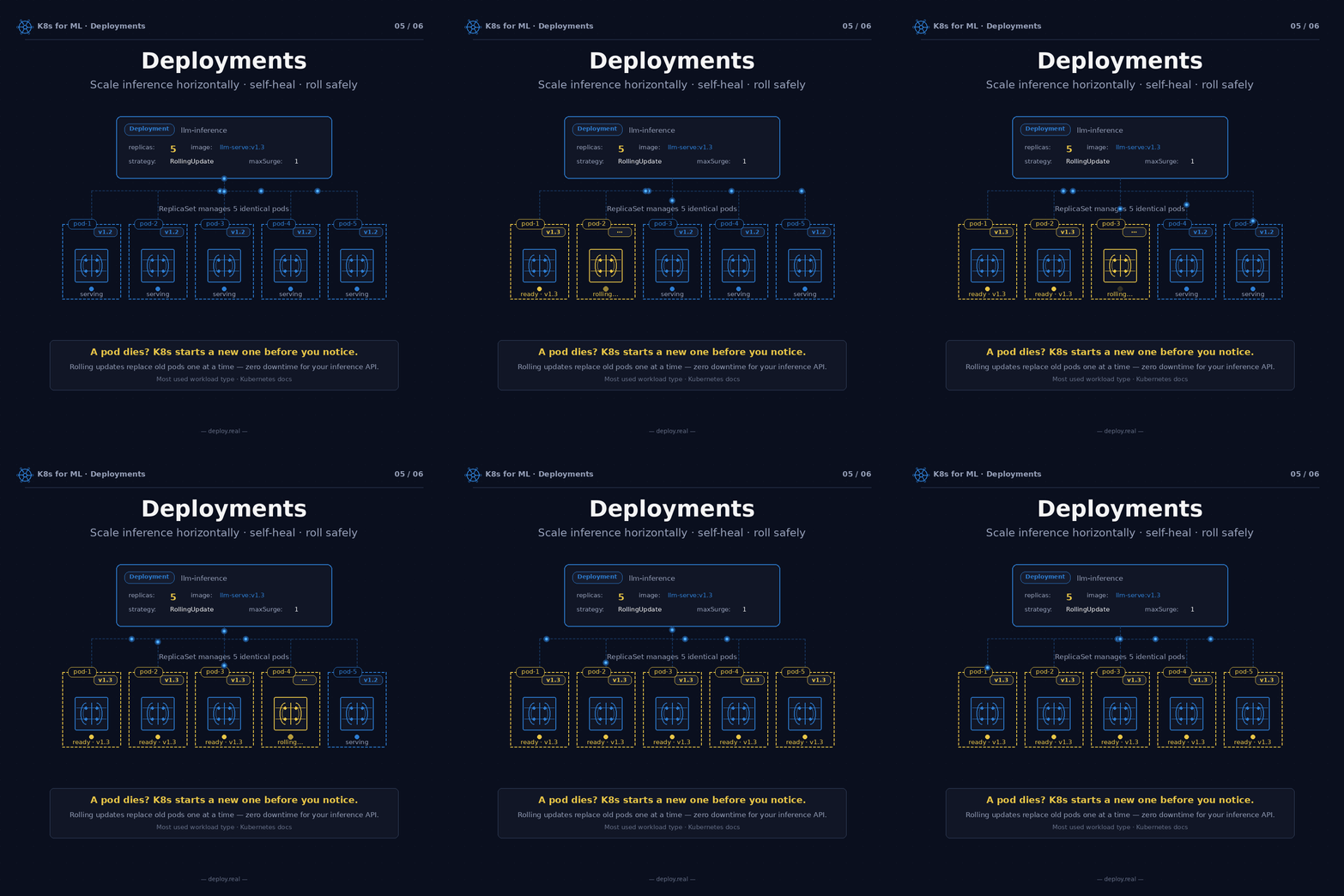
That’s why you almost never deploy raw pods in production. You deploy a Deployment, which is a spec that says “always keep N copies of this pod alive.” If one dies, the Deployment spawns a new one. If you want 5 replicas and you only have 4, it spawns the fifth. If a whole node goes down, the Deployment reschedules its pods onto healthy nodes.
# llm-inference-deployment.yaml
apiVersion: apps/v1
kind: Deployment
metadata:
  name: llm-inference
  namespace: prod
spec:
  replicas: 5
  selector:
    matchLabels:
      app: llm
  strategy:
    type: RollingUpdate
    rollingUpdate:
      maxSurge: 1
      maxUnavailable: 0
  template:
    metadata:
      labels:
        app: llm
    spec:
      containers:
        - name: llm-serve
          image: myorg/llm-serve:v1.3
          ports:
            - containerPort: 8080
          envFrom:
            - configMapRef:
                name: model-config
            - secretRef:
                name: ml-credentials
          resources:
            requests:
              cpu: "2"
              memory: "8Gi"
              nvidia.com/gpu: "1"
            limits:
              cpu: "4"
              memory: "16Gi"
              nvidia.com/gpu: "1"
A lot is happening here, so let’s break it down.
replicas: 5 — I want five copies of this inference pod running at all times. If traffic doubles, I change this number to 10. Kubernetes does the rest.
selector.matchLabels: app: llm — This Deployment manages pods labeled app=llm. That label becomes important when we get to Services in the next section.
strategy: RollingUpdate — When I ship a new version of my model (change v1.3 to v1.4), Kubernetes won't kill all five pods at once. It'll replace them one at a time. With maxSurge: 1 and maxUnavailable: 0, the process looks like this:
- Start a new v1.4 pod (now 6 pods total — 5 v1.3 + 1 v1.4)
- Wait for it to be ready (passing health checks)
- Kill one v1.3 pod (back to 5 pods — 4 v1.3 + 1 v1.4)
- Start another v1.4 pod (6 total — 4 v1.3 + 2 v1.4)
- Repeat until all five are v1.4
At no point do you have fewer than five working pods. Your inference API never drops a request. If v1.4 turns out to be broken, Kubernetes stops rolling and you can kubectl rollout undo to revert to v1.3 instantly. I've used rollout undo more times than I'd like to admit. It's saved production more than once.
resources block — This is where you declare how much of the node each pod needs. Two CPU cores and 8GiB of RAM minimum (requests), up to 4 CPUs and 16GiB (limits). One GPU, always. The scheduler uses requests to decide which node can fit the pod. The limits are hard ceilings that Kubernetes enforces.
For ML workloads, getting resource requests right is the most important thing you’ll do. Request too much and your cluster wastes capacity. Request too little and your pods get OOM-killed under load.
A pod dies? K8s starts a new one before you notice. Rolling updates replace old pods one at a time, zero downtime. That single property is the reason I sleep better at night now than I did at 2 AM four years ago.
6. Services — One name for many pods

You have five inference pods running. Traffic is flowing in. But one problem remains: each pod has a different IP address, and those IPs change every time Kubernetes reschedules them. Your mobile app can’t hardcode five IPs. It needs one stable endpoint.
That’s what a Service is.
A Service is a stable virtual IP and DNS name that sits in front of a group of pods. It watches for pods matching its selector, and automatically load-balances traffic across whichever ones are currently healthy. Pods can come and go, scale from 2 to 200 and back, and clients never have to change a single configuration line.
# llm-svc.yaml
apiVersion: v1
kind: Service
metadata:
  name: llm-svc
  namespace: prod
spec:
  type: ClusterIP
  selector:
    app: llm           # matches the Deployment's pod labels
  ports:
    - protocol: TCP
      port: 80         # the port clients connect to
      targetPort: 8080 # the port the pods actually listen on
That selector: app: llm is the glue. Any pod with the label app=llm is a backend for this Service, automatically. When the Deployment adds pod number six, the Service picks it up within seconds. When a pod dies, traffic stops routing to it.
The stable DNS name: your clients now reach the inference service at:
llm-svc.prod.svc.cluster.local
That name is permanent. Pods can be rescheduled, scaled, updated, migrated to a different node — the DNS name never changes.
Service types — a quick guide:
- ClusterIP (default) — The Service is reachable only from inside the cluster. Use this for internal services like a vector DB or a feature store that your other services talk to.
- NodePort — The Service is exposed on every node's IP at a specific port. Useful for development, rarely for production.
- LoadBalancer — If you're on a cloud provider, this provisions a real cloud load balancer (ELB / ALB / GCP LB) in front of your Service. Use this when you want external traffic to reach your pods.
- ExternalName — A DNS alias. Rarely used for ML workloads.
For most internal ML pipelines, ClusterIP is what you want. For public-facing inference APIs, you'll typically pair a ClusterIP Service with an Ingress (which we'll cover in a later post) for TLS, routing, and authentication.
Your app talks to llm-svc. Not to pods. This one piece of indirection is what lets you scale from 2 pods to 200, without a single client change.
Putting it all together: the full picture
Let’s assemble the whole thing in your head. A real production ML deployment, end to end:
- You create three Namespaces: dev, staging, prod. Every resource below exists in prod.
- You define a ConfigMap called model-config with your hyperparameters.
- You define a Secret called ml-credentials with your API keys.
- You write a Deployment that says “run 5 pods of llm-serve:v1.3, each injecting model-config and ml-credentials as env vars."
- The Deployment creates 5 Pods, each of which might have a model-server container plus sidecars for logging and metrics.
- You define a Service called llm-svc that selects all pods labeled app=llm and load-balances traffic across them.
- Your mobile app, web app, and chatbot all hit llm-svc.prod.svc.cluster.local:80 and get routed to whichever pods are healthy.
Six YAML files. A few hundred lines total. And you’ve got a self-healing, horizontally scalable, zero-downtime-deployable ML inference system.
If a pod dies, the Deployment spawns a new one. If traffic spikes, you bump replicas: 5 to replicas: 15 and Kubernetes scales out in seconds. If you ship a bad model, kubectl rollout undo reverts it before your users notice. If a node fails, your pods get rescheduled onto healthy hardware.
None of this is magic. It’s all declarative state that the cluster reconciles continuously. You describe what you want. Kubernetes makes it true.
What I wish someone had told me four years ago
Three things, in order of importance.
One: the hardest part of Kubernetes is not Kubernetes. It’s learning to think in terms of desired state instead of imperative commands. You don’t ssh into a server and start a process. You write a YAML file that describes the process you want, apply it, and let the cluster figure out how to make reality match. This shift takes most engineers about two weeks of active use to internalize. Trust the process.
Two: start small, grow into it. You don’t need a 50-node cluster with a service mesh and GPU autoscaling on day one. Start with one namespace, one Deployment, one Service. Ship it. Learn what breaks. Add the next piece when you feel the pain that piece solves. Every abstraction I’ve added to my clusters, I added after I got burned by not having it.
Three: your ML system is infrastructure, not a weekend project. The companies I’ve seen succeed with production ML treat their model serving stack with the same rigor as their payment processing. They version it. They roll it back. They monitor it. They run incident post-mortems when it breaks. The ones I’ve seen fail treat it as a thing their “AI engineer” maintains on the side, in a Python script, on a VM, with an .env file.
Kubernetes, in the end, is just one instance of this broader principle: ML is real engineering, and real engineering has real infrastructure.
Six resources. One production system. No fluff.
That’s the foundation. Build on top of it.
If you’re working on deploying an ML system and this walkthrough helped, the next parts of this series will cover Ingress controllers for external traffic, HorizontalPodAutoscalers for demand-based scaling, StatefulSets for vector databases, and Jobs + CronJobs for the training and evaluation side of the pipeline. Same lens — what actually matters for ML in production.