
Run Your First Agentic AI System on Your Own Laptop
Bhupin Baral
April 27, 2026
A complete, beginner-friendly guide to deploying a daily tech-news agent on local Kubernetes — with Ollama, Gemma 3, and K9s for monitoring.
Most “build your first agent” tutorials skip the part that actually matters in production: where is this thing going to run?
You can wire up an LLM, glue some tools together, and call it an agent. But the moment you try to put it somewhere — anywhere — you’re back in infrastructure land. Containers. Networking. Storage. Restarts. Observability.
So let’s do it the right way from day one.
This guide walks you through deploying a real agentic system on Kubernetes — running entirely on your laptop, using a small open model, with proper monitoring. By the end, you’ll have:
- A 3-node Kubernetes cluster running locally
- Ollama serving a Gemma 3 1B model inside that cluster
- A multi-pattern news agent (parallel fetch → routing → prompt chaining) reading from trusted sources
- K9s as your live dashboard
- A daily cron that keeps it warm
Zero API bills. Zero data leaving your machine. Same architecture you’d ship to production.
Why this stack
A quick honest take on each choice before we dive in.
Kind (Kubernetes-in-Docker). The fastest way to run real Kubernetes on a laptop. Nodes are Docker containers. No VMs. Spins up in 30 seconds. It’s what the Kubernetes maintainers themselves use to test Kubernetes.
Ollama. The simplest way to serve open LLMs. Single binary, OpenAI-compatible-ish API, handles model management. Works fine on CPU for small models.
Gemma 3 1B. Google’s small open model. 815 MB on disk, 32K context, multilingual, runs comfortably on laptop CPU. Big enough for classification, ranking, and short-form summarization. Small enough that you don’t need a GPU to play with it.
K9s. A terminal UI for Kubernetes. Once you use it, kubectl get pods -w feels like driving a car with no dashboard. Live pod status, logs, events, exec — all keyboard-driven.
FastAPI for the agent. Async by default, easy to reason about, fits the I/O-bound nature of agent workloads (fanning out HTTP calls, waiting on the LLM).
What you need installed before we start
Run these checks. If any of them fail, install the tool first.
docker version          # any recent Docker Desktop or Docker Engine
kind --version          # ≥ v0.31
kubectl version --client # ≥ 1.30
k9s version             # any recent
python3 --version       # 3.10+
Install commands (skip what you have):
# macOS (Homebrew)
brew install kind kubectl k9s
# Linux
# kind
[ $(uname -m) = x86_64 ] && curl -Lo ./kind https://kind.sigs.k8s.io/dl/v0.31.0/kind-linux-amd64
chmod +x ./kind && sudo mv ./kind /usr/local/bin/kind
# kubectl (just an example — pin a stable version in your team)
curl -LO "https://dl.k8s.io/release/$(curl -L -s https://dl.k8s.io/release/stable.txt)/bin/linux/amd64/kubectl"
sudo install -o root -g root -m 0755 kubectl /usr/local/bin/kubectl
# k9s (Debian/Ubuntu)
curl -L -o k9s.deb https://github.com/derailed/k9s/releases/latest/download/k9s_linux_amd64.deb
sudo apt install ./k9s.deb && rm k9s.deb
Docker Desktop or Docker Engine is the only hard prerequisite — Kind needs it.
The architecture in one breath
Before code, the picture:
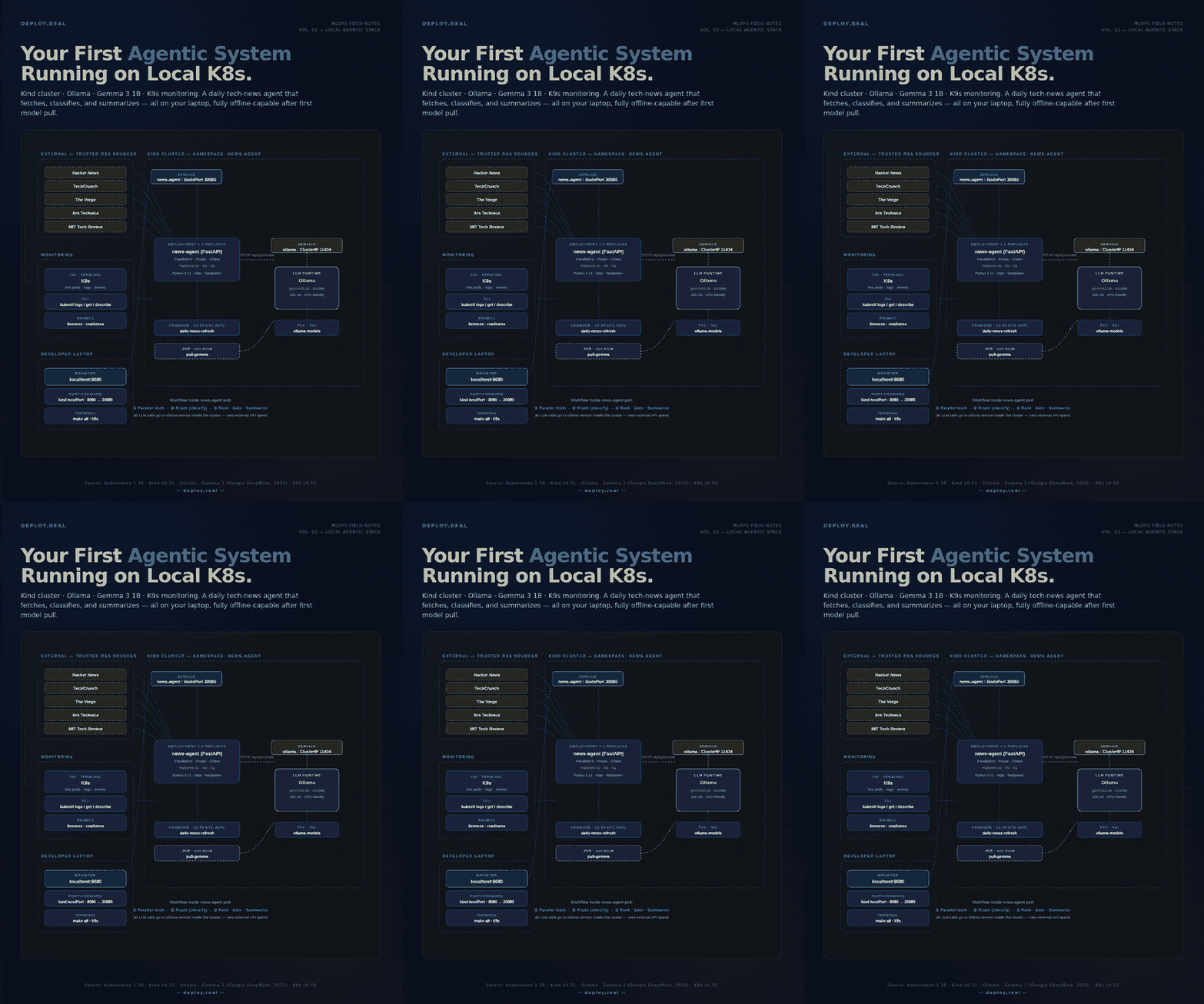
- One Kind cluster with 1 control-plane and 2 worker nodes
- One Ollama deployment with a persistent volume holding the model weights
- A one-shot Job that pulls Gemma 3 1B into Ollama on first run
- A News Agent deployment (2 replicas, FastAPI) that:
- Fetches RSS from 5 trusted sources in parallel (Pattern: Parallelization)
- Asks Gemma to classify each article into AI / Infra / Startups / Other (Pattern: Routing)
- Ranks the kept articles 1–10, gates to top 8, then summarizes (Pattern: Prompt Chaining)
- A daily CronJob that pings the agent at 13:00 UTC to keep it warm
- K9s running on your terminal as the live dashboard
All HTTP traffic between the agent and the LLM stays inside the cluster. The only things crossing your network boundary are the RSS fetches.
The project layout
Create this folder structure on your machine. Every file is short — I’ll show each one.
local-agent/
├── Makefile
└── code/
    ├── agent/
    │   ├── Dockerfile
    │   ├── requirements.txt
    │   └── news_agent.py
    └── k8s/
        ├── 00-kind-config.yaml
        ├── 01-namespace.yaml
        ├── 02-ollama.yaml
        ├── 03-pull-model.yaml
        ├── 04-news-agent.yaml
        └── 05-cronjob.yaml
Step 1 — The Kind cluster
The cluster config. Three nodes. Two important port mappings: one to expose the agent on your laptop’s port 8080, one optional for direct Ollama access.
code/k8s/00-kind-config.yaml
kind: Cluster
apiVersion: kind.x-k8s.io/v1alpha4
name: news-agent
nodes:
  - role: control-plane
    extraPortMappings:
      - containerPort: 30434      # ollama NodePort
        hostPort: 11434
        protocol: TCP
      - containerPort: 30080      # news-agent NodePort
        hostPort: 8080
        protocol: TCP
  - role: worker
  - role: worker
Bring it up:
kind create cluster --config code/k8s/00-kind-config.yaml
kubectl cluster-info --context kind-news-agent
Verify:
kubectl get nodes
# Should show 3 nodes: 1 control-plane + 2 workers, all Ready.
Why 3 nodes on a laptop? You don’t need them for this workload. But you want to feel real Kubernetes — pod scheduling across nodes, services routing traffic, what “node affinity” means in practice. One-node clusters teach you bad habits.
Step 2 — A namespace to keep things tidy
code/k8s/01-namespace.yaml
apiVersion: v1
kind: Namespace
metadata:
  name: news-agent
  labels:
    app: news-agent
    environment: dev
kubectl apply -f code/k8s/01-namespace.yaml
Everything from here lives in the news-agent namespace. Always use namespaces. Even on day one.
Step 3 — Deploy Ollama with persistent storage
This is the LLM runtime. The PVC is critical — without it, every pod restart re-downloads the model.
code/k8s/02-ollama.yaml
---
apiVersion: v1
kind: PersistentVolumeClaim
metadata:
  name: ollama-models
  namespace: news-agent
spec:
  accessModes: [ReadWriteOnce]
  resources:
    requests:
      storage: 5Gi
---
apiVersion: apps/v1
kind: Deployment
metadata:
  name: ollama
  namespace: news-agent
spec:
  replicas: 1
  strategy: { type: Recreate }       # PVC is RWO; can't run two pods at once
  selector:
    matchLabels: { app: ollama }
  template:
    metadata:
      labels: { app: ollama }
    spec:
      containers:
        - name: ollama
          image: ollama/ollama:latest
          ports:
            - { containerPort: 11434, name: api }
          env:
            - { name: OLLAMA_HOST, value: "0.0.0.0" }
            - { name: OLLAMA_KEEP_ALIVE, value: "30m" }   # keep model warm
          volumeMounts:
            - { name: models, mountPath: /root/.ollama }
          resources:
            requests: { cpu: "500m", memory: "2Gi" }
            limits:   { cpu: "4",    memory: "6Gi" }
          readinessProbe:
            httpGet: { path: /api/tags, port: 11434 }
            initialDelaySeconds: 10
            periodSeconds: 10
      volumes:
        - name: models
          persistentVolumeClaim:
            claimName: ollama-models
---
apiVersion: v1
kind: Service
metadata:
  name: ollama
  namespace: news-agent
spec:
  type: NodePort
  selector: { app: ollama }
  ports:
    - { port: 11434, targetPort: 11434, nodePort: 30434, name: api }
Deploy and wait:
kubectl apply -f code/k8s/02-ollama.yaml
kubectl -n news-agent rollout status deploy/ollama --timeout=180s
What just happened:
- The Service named ollama gives every pod inside the cluster a stable DNS name: http://ollama:11434. Your agent will use this.
- The NodePort on 30434 is only needed if you want to poke at Ollama from your laptop. The agent itself never uses it.
- OLLAMA_KEEP_ALIVE=30m keeps the model loaded in memory between requests. First request is slow (model load), subsequent requests are fast. This is your most important Ollama tuning knob.
Step 4 — Pull the Gemma model into Ollama
A one-shot Job. It waits for Ollama to be ready, then asks it to download gemma3:1b.
code/k8s/03-pull-model.yaml
apiVersion: batch/v1
kind: Job
metadata:
  name: pull-gemma
  namespace: news-agent
spec:
  backoffLimit: 3
  template:
    spec:
      restartPolicy: OnFailure
      containers:
        - name: pull
          image: curlimages/curl:8.10.1
          command:
            - sh
            - -c
            - |
              echo "Waiting for Ollama..."
              until curl -sf http://ollama:11434/api/tags >/dev/null; do
                sleep 3
              done
              echo "Pulling gemma3:1b..."
              curl -sf http://ollama:11434/api/pull \
                -d '{"name":"gemma3:1b","stream":false}' \
                -H 'Content-Type: application/json'
              echo "Done."
kubectl apply -f code/k8s/03-pull-model.yaml
kubectl -n news-agent wait --for=condition=complete job/pull-gemma --timeout=600s
The pull takes ~30–60 seconds depending on your bandwidth. Watch it live:
kubectl -n news-agent logs -f job/pull-gemma
Why a Job and not a sidecar? The model only needs to be downloaded once. After that, it’s on the PVC. A Job runs once, exits, leaves no residue. A sidecar would consume resources forever for a one-time task.
Step 5 — The agent itself
Now the interesting part. The agent is one Python file that composes three workflow patterns: parallelization, routing, and prompt chaining with a gate.
code/agent/news_agent.py (key sections — full file in the project)
import asyncio, httpx, feedparser, os
from fastapi import FastAPI
OLLAMA_URL = os.getenv("OLLAMA_URL", "http://ollama:11434")
MODEL = os.getenv("OLLAMA_MODEL", "gemma3:1b")
SOURCES = [
("Hacker News", "https://hnrss.org/frontpage"),
("TechCrunch", "https://techcrunch.com/feed/"),
("The Verge", "https://www.theverge.com/rss/index.xml"),
("Ars Technica", "https://feeds.arstechnica.com/arstechnica/index"),
("MIT Tech Rev.", "https://www.technologyreview.com/feed/"),
]
async def call_llm(prompt: str, system: str = "") -> str:
    payload = {"model": MODEL, "prompt": prompt, "system": system,
               "stream": False, "options": {"temperature": 0.2}}
    async with httpx.AsyncClient(timeout=120.0) as c:
        r = await c.post(f"{OLLAMA_URL}/api/generate", json=payload)
        return r.json().get("response", "").strip()
The three patterns, expressed plainly:
# PATTERN 1: Parallelization — fan out RSS fetches
async def parallel_fetch():
    loop = asyncio.get_event_loop()
    tasks = [loop.run_in_executor(None, fetch_feed, n, u)
             for n, u in SOURCES]
    return [a for batch in await asyncio.gather(*tasks) for a in batch]
# PATTERN 2: Routing — LLM picks a category for each article
async def classify(article):
    prompt = f"Title: {article.title}\nClassify into ONE of: AI, Infra, Startups, Other."
    article.category = (await call_llm(prompt)).split()[0].capitalize()
    return article
# PATTERN 3: Prompt Chaining — rank cheaply, gate, summarize the winners
async def chain_process(articles):
    ranked = await asyncio.gather(*[rank(a) for a in articles])
    ranked.sort(key=lambda a: a.score, reverse=True)
    winners = ranked[:8]                           # the gate
    return await asyncio.gather(*[summarize(a) for a in winners])
The full file has type hints, error handling, an HTML index page, and a /news JSON endpoint. Why this matters:
- Bounded concurrency. Every batch of LLM calls is wrapped in a Semaphore(4). You don't want 25 parallel calls to a 1B model on CPU — you'll thrash.
- Cheap before expensive. Ranking is one-token output (“7”). Summarization is 30+ tokens. We rank everyone, gate to the top 8, then summarize. Same pattern you’d use with paid APIs to control cost.
- Always-fallback. If the routing LLM returns something weird, we default to Other rather than crashing. Never let the router fail closed.
Step 6 — Containerize the agent
code/agent/requirements.txt
fastapi==0.115.6
uvicorn[standard]==0.32.1
httpx==0.28.1
feedparser==6.0.11
code/agent/Dockerfile
FROM python:3.12-slim
WORKDIR /app
COPY requirements.txt .
RUN pip install --no-cache-dir -r requirements.txt
COPY news_agent.py .
RUN useradd -m -u 1000 app && chown -R app:app /app
USER app
EXPOSE 8000
CMD ["uvicorn", "news_agent:app", "--host", "0.0.0.0", "--port", "8000"]
Build and load into Kind:
docker build -t news-agent:0.1.0 code/agent
kind load docker-image news-agent:0.1.0 --name news-agent
kind load docker-image is the trick that lets your locally-built image work without pushing to a registry. It copies the image directly into Kind's nodes.
Step 7 — Deploy the agent
code/k8s/04-news-agent.yaml
---
apiVersion: apps/v1
kind: Deployment
metadata:
  name: news-agent
  namespace: news-agent
spec:
  replicas: 2
  selector:
    matchLabels: { app: news-agent }
  template:
    metadata:
      labels: { app: news-agent }
    spec:
      containers:
        - name: agent
          image: news-agent:0.1.0
          imagePullPolicy: IfNotPresent
          ports:
            - { containerPort: 8000, name: http }
          env:
            - { name: OLLAMA_URL, value: "http://ollama:11434" }
            - { name: OLLAMA_MODEL, value: "gemma3:1b" }
          resources:
            requests: { cpu: "100m", memory: "128Mi" }
            limits:   { cpu: "500m", memory: "512Mi" }
          livenessProbe:
            httpGet: { path: /healthz, port: 8000 }
            initialDelaySeconds: 5
            periodSeconds: 30
          readinessProbe:
            httpGet: { path: /healthz, port: 8000 }
            initialDelaySeconds: 3
            periodSeconds: 10
---
apiVersion: v1
kind: Service
metadata:
  name: news-agent
  namespace: news-agent
spec:
  type: NodePort
  selector: { app: news-agent }
  ports:
    - { port: 80, targetPort: 8000, nodePort: 30080, name: http }
kubectl apply -f code/k8s/04-news-agent.yaml
kubectl -n news-agent rollout status deploy/news-agent --timeout=120s
Visit http://localhost:8080 in your browser. You should see the daily news brief, generated by the agent, summarized by Gemma running inside Kubernetes on your laptop.
The first request takes ~20–40 seconds (model loads on first use). Subsequent requests are much faster.
Step 8 — A daily refresh cron
Optional but a great teaching pattern. A CronJob that triggers the agent every morning.
code/k8s/05-cronjob.yaml
apiVersion: batch/v1
kind: CronJob
metadata:
  name: daily-news-refresh
  namespace: news-agent
spec:
  schedule: "0 13 * * *"               # 13:00 UTC ≈ 8am ET
  concurrencyPolicy: Forbid
  successfulJobsHistoryLimit: 2
  jobTemplate:
    spec:
      backoffLimit: 2
      template:
        spec:
          restartPolicy: OnFailure
          containers:
            - name: trigger
              image: curlimages/curl:8.10.1
              command:
                - sh
                - -c
                - |
                  curl -sf --max-time 300 http://news-agent/news \
                    -o /tmp/news.json
                  wc -c /tmp/news.json
kubectl apply -f code/k8s/05-cronjob.yaml
In production, you’d write the result to S3, push to Slack, send an email, or stash it in Postgres. The pattern is the same — a CronJob calls a service inside the cluster, the service does the work.
Step 9 — Watch everything live with K9s
This is where local Kubernetes stops feeling abstract.
k9s
You’re now in a TUI dashboard. Some keys you’ll use immediately:
Key What it does :pods Show pods :svc Show services :deploy Show deployments :jobs Show jobs (and CronJob runs) l Stream logs of the highlighted pod d Describe the highlighted resource s Shell into the pod (exec -it) / Filter the current view Ctrl+a Show all available commands :q Quit
Try this: with K9s open on :pods, hit your http://localhost:8080 from the browser, and watch the agent pods light up with traffic in real time. Press l on a pod to stream its logs.
This is the same experience your platform team has on production clusters — just smaller. The architecture you learn here is the architecture you ship.
The Makefile that ties it all together
So you don’t have to remember any of this:
CLUSTER := news-agent
IMAGE   := news-agent:0.1.0
NS      := news-agent
cluster-up:
	kind create cluster --config code/k8s/00-kind-config.yaml
build:
	docker build -t $(IMAGE) code/agent
load:
	kind load docker-image $(IMAGE) --name $(CLUSTER)
deploy:
	kubectl apply -f code/k8s/01-namespace.yaml
	kubectl apply -f code/k8s/02-ollama.yaml
	kubectl -n $(NS) rollout status deploy/ollama --timeout=180s
	kubectl apply -f code/k8s/03-pull-model.yaml
	kubectl apply -f code/k8s/04-news-agent.yaml
	kubectl -n $(NS) rollout status deploy/news-agent --timeout=120s
	kubectl apply -f code/k8s/05-cronjob.yaml
pull-model:
	kubectl -n $(NS) wait --for=condition=complete job/pull-gemma --timeout=600s
all: cluster-up build load deploy pull-model
	@echo "✅ Visit http://localhost:8080"
logs:
	kubectl -n $(NS) logs -l app=news-agent -f --tail=50
k9s:
	k9s -n $(NS)
clean:
	kind delete cluster --name $(CLUSTER)
From a fresh clone:
make all      # spin up everything
make k9s      # open the dashboard
make logs     # tail agent logs
make clean    # tear it all down
What you actually learned
If you got here, you didn’t just deploy an agent. You learned:
- How services talk inside a cluster — the agent calls Ollama as http://ollama:11434 because of cluster-internal DNS.
- Why a PVC matters — model weights are 800+ MB. Re-downloading them on every pod restart is a no-go.
- What KEEP_ALIVE does for an LLM server — keeping the model in memory between requests is the difference between 20s and 200ms responses.
- Why three patterns is enough for most agents — parallelize the IO, route to the right path, chain the expensive steps with a cheap gate. You did not need a “true” autonomous agent for any of this.
- What “production-shaped” looks like — namespaces, probes, resource limits, services, jobs, cronjobs, persistent volumes. Every one of these has a direct equivalent in EKS, GKE, AKS.
The architecture you just deployed scales to production with one substitution: swap Kind for a managed cluster, swap Ollama-on-CPU for vLLM-on-GPU (or keep Ollama on a small GPU node), swap K9s for Grafana + Prometheus when you have more than one engineer looking. Everything else stays.
Most teams treat their first AI agent as a demo. They build it on someone’s laptop, in a notebook, with no infrastructure underneath, and then spend three months trying to get it into production.
The teams that win do the opposite. They start with the smallest possible production-shaped deployment — even on a laptop — and add scale only when the metrics force them to.
You just did that.
Built and tested with Kubernetes 1.36, Kind v0.31, Ollama latest, Gemma 3 1B, and K9s v0.50. Sources: official documentation from each project, plus production experience deploying these patterns at real scale.
— deploy.real